ESP32 Live Stock Ticker: Watchlist, Charts & Rotary Encoder
S&P 500, Apple, Bitcoin and Roche live on a 128x64 OLED. EC11 rotary encoder for navigation, double-click for chart mode with 8 time ranges, 3 FreeRTOS tasks and a crying pixel smiley on red days.
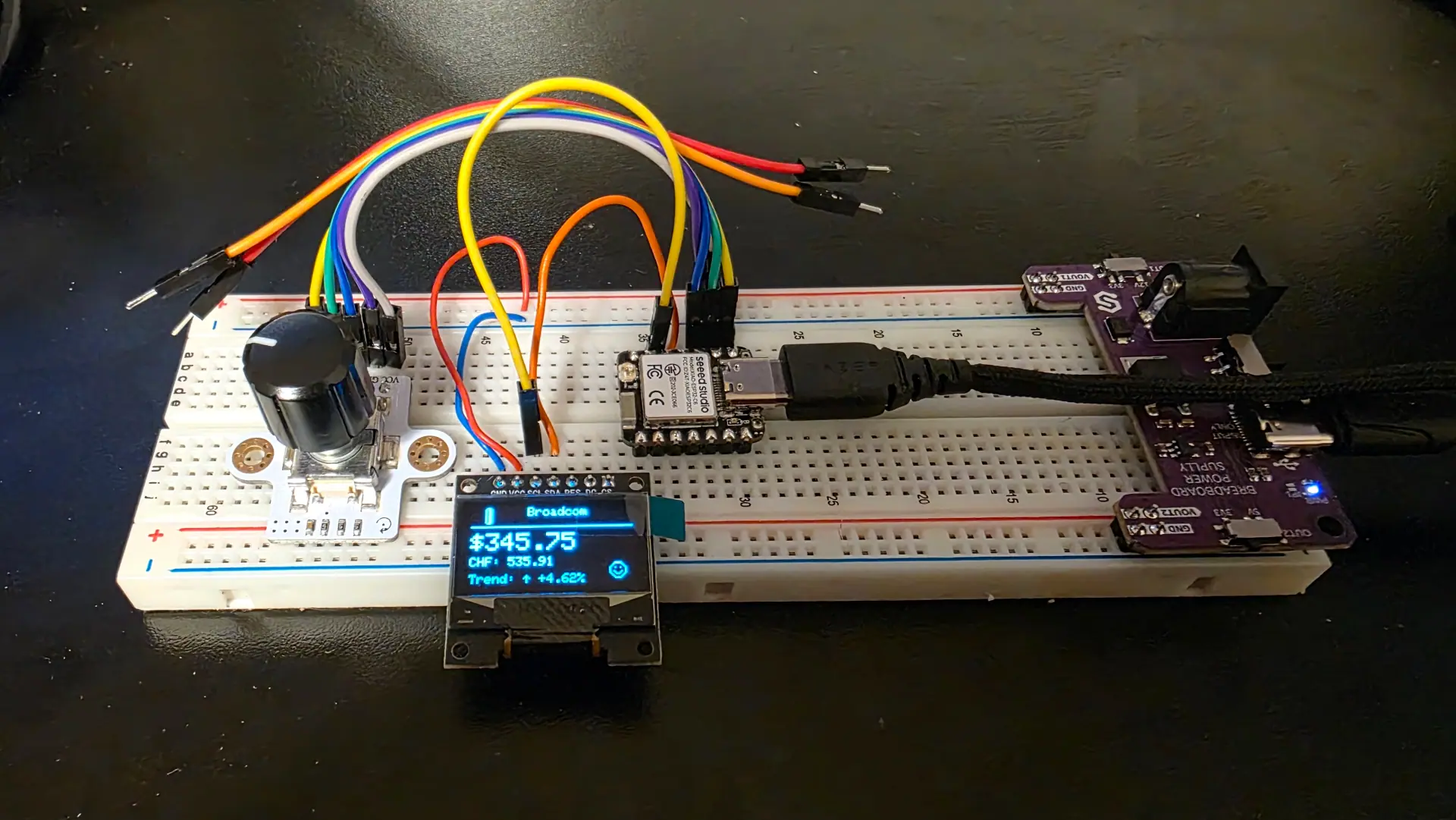
Not every project needs to solve a real problem. Sometimes you just want to know if the S&P 500 is down again without opening your phone. So: breadboard, XIAO ESP32-C6, a tiny SSD1306 OLED, an EC11 rotary encoder and a free Yahoo Finance API endpoint. What started as a quick weekend build slowly turned into a full watchlist viewer with interactive charts, smooth scroll transitions and a bitmap loading animation stored in PROGMEM.
What It Does
Turn the encoder to scroll through your watchlist, click once to refresh the current stock manually, double-click to open a price chart. Rotate in chart mode to switch between 8 time ranges (1d, 5d, 1mo, 6mo, ytd, 1y, 5y, max). Click once to exit the chart. After 7 seconds of inactivity the display starts auto-scrolling through stocks on its own.
The watchlist is stored in LittleFS on the ESP32 and gets synced from a GitHub Gist on every boot, so updating your tracked stocks is just editing a JSON file online. The fallback hardcoded list covers S&P 500, Apple, Microsoft, Nvidia, Tesla, Bitcoin and Roche (ROG.SW for CHF stocks).
EC11 Rotary Encoder
The EC11 encoder module connects to GPIO2 (A), GPIO1 (B) and GPIO0 (button) on the XIAO ESP32-C6. Both signal lines are interrupt-driven so no polling overhead and no missed steps at fast rotation speeds.
The RotaryEncoder library runs in FOUR3 latch mode, which gives clean, debounce-free detent steps. The encoder tick() function is called both from the ISRs on channel change and from the main loop for redundancy.
encoder = new RotaryEncoder(ROTARY_PIN_A, ROTARY_PIN_B, RotaryEncoder::LatchMode::FOUR3);
attachInterrupt(digitalPinToInterrupt(ROTARY_PIN_A), []() { encoder->tick(); }, CHANGE);
attachInterrupt(digitalPinToInterrupt(ROTARY_PIN_B), []() { encoder->tick(); }, CHANGE);
The button uses a 50ms software debounce. A double-click (two presses within 500ms) enters chart mode. Single click in normal mode triggers an immediate stock refresh. The LED on GPIO15 blinks 5 times when data is fetched and blinks again if the price actually changed since the last read.
FreeRTOS Task Architecture
Three tasks run in parallel:
displayTask (priority 2, 8192 byte stack) owns the OLED at 30fps. It reads from shared volatile globals and renders whatever the current state is: stock view, chart, loading animation or WiFi setup screen. All of this keeps running during network activity without any visible stutter.
networkTask (priority 1, 16384 byte stack) fetches prices for all watchlist stocks every 15 minutes, one at a time to keep the WiFi stack stable. The USD/CHF exchange rate is updated separately once every 24 hours. Each batch cycle is signaled by 5 LED blinks at the start.
chartTask (priority 0, 8192 byte stack) handles on-demand chart data loading. When chart mode is entered or the time range changes, it fetches historical OHLCV data for the current stock and caches it for up to 1 hour. Running at the lowest priority means it never starves the display or network tasks.
Smooth Scroll Between Stocks
When you turn the encoder in normal mode, switching stocks triggers a pixel-level scroll reveal animation. The current frame is captured into a buffer, the next frame is rendered into a second buffer, and the display task blends between them by shifting pixel columns left or right over 350ms using memmove on the OLED frame buffer directly.
// Left or right scroll depending on encoder direction
memmove(dst, dst + offset, SCREEN_WIDTH - offset);
memcpy(dst + (SCREEN_WIDTH - offset), nextSrc, offset);
No sprite libraries, no malloc, just direct framebuffer manipulation at 30fps.
Chart Mode
Double-click opens a price chart for the current stock. The chart renderer uses TomThumb, a tiny 3x5 bitmap font, for the axis labels so they fit without overlapping the price line. The Y axis shows min and max price, the X axis shows timestamps formatted to match the selected range: HH:MM for 1d, DD.MM for weekly ranges, MM.YY for 1y and YYYY for 5y and max.
Price data and timestamps come from the Yahoo Finance chart endpoint via HTTPS. Time zone is set to CET/CEST so the 1d chart shows local market hours correctly.
Rotate the encoder in chart mode to step through all 8 ranges. The chart cache keeps the last loaded data per stock per range for up to an hour, so switching back to a previously viewed range is instant.
The Loading Animation
While chart data is fetching, a 48x48 pixel bitmap animation plays in the center of the screen. The 24 frames are stored in PROGMEM in LoadingChart.h as a flat byte array at 42ms per frame, around 24fps. The animation was designed in Wokwi Animator and then adapted for the OLED and split into the PROGMEM format. Getting the frame data into a format that fits Arduino’s memory model without blowing the stack was the most tedious part of the whole build. Editing large header files in the Arduino IDE window is not exactly a great experience.
The Spinning Dollar Coin
The header on the stock view shows a rotating 3D dollar coin built from drawRoundRect and a single $ character. The coin width is abs(cos(angle) * 8) per frame, which gives a perspective squish effect as it spins. When the coin is edge-on (width below 3 pixels) it falls back to a vertical line.
Market up: bouncing happy smiley in the bottom right corner. Market down: crying smiley with a 2x2 pixel tear rolling down the face, one pixel per 3 frames.
WiFi Provisioning
On first boot the ESP32 falls back to SmartConfig if no credentials are saved. Open the Espressif app, enter your WiFi password and the ESP32 picks it up over the air. Credentials get saved to flash so every boot after that connects automatically without any hardcoded SSID in the code.
Hardware
Four components, one breadboard:
- XIAO ESP32-C6 dev board
- SSD1306 128x64 OLED, I2C on GPIO22/GPIO23 (0x3C)
- EC11 rotary encoder module
- USB-C for power
Total cost around 8 euros from AliExpress if you are patient. All power comes directly from the 3.3V pin, no extra regulators needed.
Want something like this for a custom dashboard or instrument panel? Get in touch.
Michael Neumüller
Embedded & hardware engineer · Bern